Excel Auto Form 15G for AY 2025-26 and 2026-27 with database as revised and simplified
Form 15G is a declaration under sub section (1) and (1A) of section 197A of the Income Tax Act, 1961 which can be given by an individual or a person (other than company or firm) to the person responsible for payment of certain income, without deduction of tax at source. In other words, this is a declaration for receiving certain incomes without TDS (tax deducted at source).
The type of income(s) for which this declaration can be given is as under:
1. Dividends – Section 194
2. Payments in respect of deposits under National Saving Scheme, etc. – Section 194EE
3. Interest on Securities – Section 193
4. Interest other than interest on securities – Section 194A
5. Income in respect of units of Mutual Funds, UTI – Section 194K
The important point to note is that if the income from the above mentioned income sources exceeds the maximum amount which is not chargeable to tax , this declaration can not be given.
Read CPC Bangalore communication in this respect Click Here >>
In other words, if for AY 2025-26, income from above listed sources exceed Rs. 250000/- which is the maximum amount not chargeable to tax, this declaration can not be given.
The declaration is required to be given in duplicate before the payment is made or credited whichever is earlier.
In case a false declaration is given in form 15G, which the declarant either knows or believes to be false, or does not believe to be true, the declarant, under section 277 is punishable with imprisonment which can be up to seven years and with fine .
Form 15G and Form 15H have been modified vide CBDT Notification 76/2015 dated 29/09/2015. With effect from 01/10/2015 new simplified forms have been introduced. Also, vide Notification No. 04/2015 dated 01/12/2015 provides for furnishing of electronic declarations and procedure for e-filing of Form 15G 15H by the deductors.
ABCAUS Excel based form 15G is very simple, speedy and useful for professionals and individual users also. The steps involved in filling the form are as under:
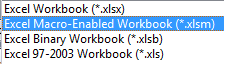
1. Save the file as ‘Excel macro-Enabled Workbook (*.xlsm)
2. The user is required to build a database of payees to avoid repetitive entries.
3. After creating database, select serial no. 2. “PAN” from drop down to complete auto filling of the para 1 to 14
4. Select serial no. 4. ‘Previous Year” from drop down.
5. Information from serial no. 15 to 19 marked in grey should be manually filled.
6. To reset the form use “reset form” button.
Macros must be enabled to use this form.
Download abcaus Excel Form 15G with data base Click Here >>
Empanelment to act as ICAI exam observers for January 2027 CA Examination. Last date to apply is 20.11.2026 Empanelment of…
No arrest under GST- Major decision taken in 57th Meeting of the GST Council on 8th October 2026 PRESS RELEASE…
A subsequent Apex Court ruling on the substantive issue cannot retrospectively make an act done in compliance of a binding…
Interest payment on mobilisation advance to NHAI not liable for deduction of tax at source u/s 194A - ITAT Interest…
Typographical error in turnover declared in ITR was not as a mistake apparent from the record u/s 154 when AO…
Ground taken by assessee that he was not aware of the order cannot be brushed aside so lightly in absence…

View Comments
Coloumn no. 4 -- Previous year - 2015-16 for AY 2016-17 is not available in the drop down box. So for the FY 2015-16 is also included in the drop down box. Otherwise it is not useful for the current AY
The new cannot be downloaded.. The link shows 404 error.
resolved. download now
ONLY NAME ADDRESS AND PAN NO CAN BE FILED BUT INT ON FD AND INCOME CANT BE ADDED SO NOT MUCH USEFUL.
ALSO NO OPTION TO ADD CUSTOMERS ANNUAL INCOME.
DEDUCTORS DETAILS LIKE TAN PAN ADDRESS COMPANY NAME CANT BE FIELD
Ok. Thank you very much..
facility to insert more rows in form 15g and 15h has been enabled. re-download the utility. thanks
How to add more rows in the 15G excel utility.